Use field autocomplete in your Blastform forms
🎯 General principle
You send a e-mail or a SMS to your database and wish increase your conversion rates ?
The function of field autocomplete Blastform allows you to automatically pre-fill your form fields (like email or phone) using a simple variable in the URL.
📸 Step 1 — Create the variable in the form field
1️⃣ Go to your dashboard Build → Desired field step → Edit the field.
2️⃣ In the section Variable name, enter the name you want to use (e.g.: e-mail).
3️⃣ Click on Save.
🖼️ Illustration: field editing + "personalization variable" area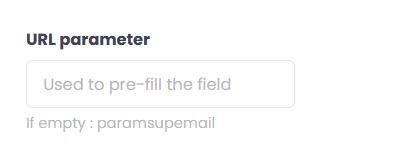
💡 This variable will receive the data sent through the URL (email, phone, first name, etc.).
🔗 Step 2 — Add the variable to the form URL
Once the variable is created, you simply need to add it to the end of your form's URL.
For example :
If your URL already contains a "?", simply add &email=test@test.fr at the end.
📍 Example of a complete URL:https://form.io/formulaire?source=campagne_sms&email=test@test.fr
⚙️ Step 3 — Use dynamic variables in your mailings
To enable autofill for each contact, you need to call the variable used in your sending tool.
The syntax may vary depending on the platform:
- Example on some tools:
#e-mail#,#phone#,#first name#, etc. - You will then get a dynamic URL like:
www.form.io/formulaire?email=#email#
💡 Ask your sending tool (email or SMS) what is the correct syntax to use for your custom variables?
🧭 Quick checklist
✅ Variable created in Blastform (e.g. email)
✅ URL correctly constructed with ? or & as applicable
✅ Test performed with fixed data (e.g.: test@test.fr)
✅ Dynamic variables activated in your mailing tool
🚀 Benefits
Higher completion and conversion rates
Save time for your users (form already partially filled in)
Fewer input errors