_
Send leads from Blastform API to Zapier
🎯 General principle
When a form is submitted, the data is automatically sent to the configured URL as an HTTP request POST with the information in JSON.
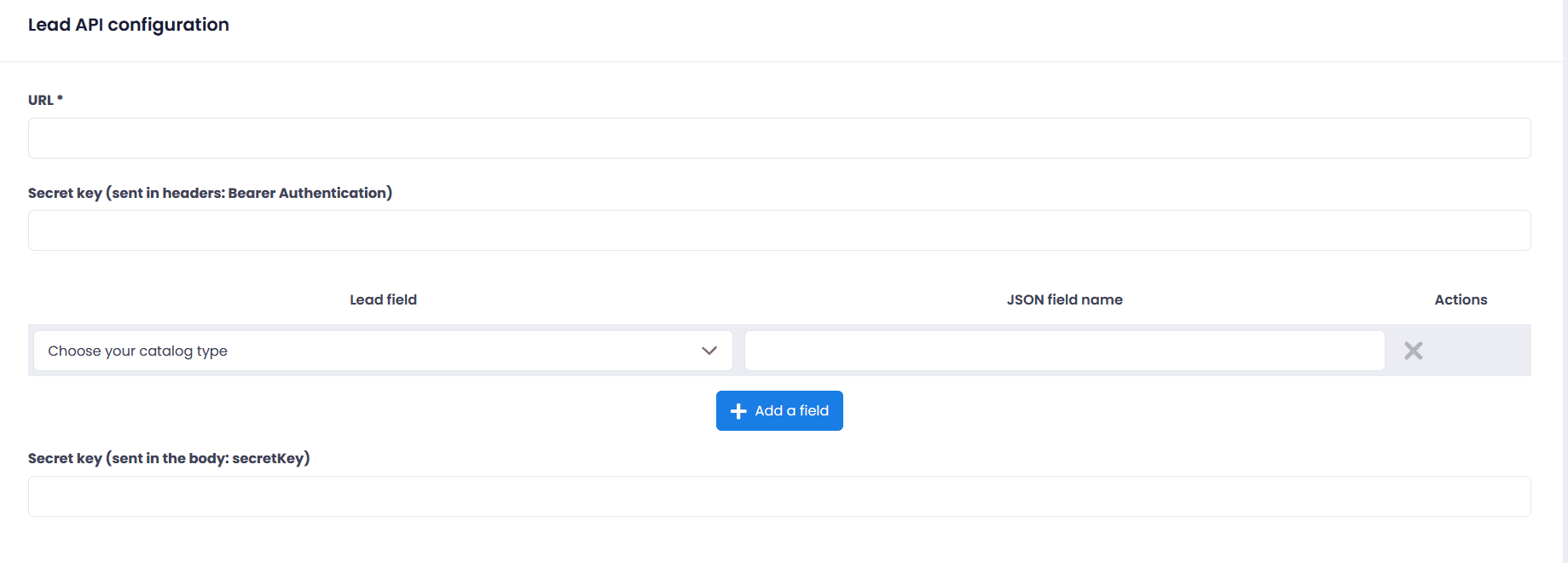
Each form has its own configuration. To set it up: Settings → API Lead configuration.
📸 Configuration interface
The page API Lead Configuration it comprises 3 main zones:
- URL* The address to send the data to (required).
- Secret key (Bearer Authentication) : To secure the delivery (sent in the headers).
- Field mapping : Mapping between your form fields and the JSON names.
- Left column : The form field (e.g. Last name, Email, Mobile phone)
- Right column : The name that will be sent in JSON (e.g. nom, email, mobile_phone)
- Secret key (body) : Optional key sent in the request body.
💡 You can add as many mappings as needed with the button + Add a field.
Blastform API To Zapier
-
When to use it? An alternative to Make, easy for non-technical users.
Example configuration
- URL https://hooks.zapier.com/hooks/catch/123456/abcdef/
- Secret key (Bearer) : leave blank
Mapping (example) same as the other cases (nom, email, mobile_phone).
Steps in Zapier
- Create a Zap.
- Trigger → Webhooks by Zapier → Catch Hook → Copy the URL.
- Paste this URL into your interface.
- Submit a test form → data visible in Zapier.
- Add action(s) (Mailchimp, Google Sheets, Slack…), map the fields.
Example of payload received by Zapier
{
"Name": "Doe",
“email”: “contact@example.com”,
"mobile_phone": "+12135096995
}Benefits
- Very intuitive interface, 5,000+ integrations, ready-to-use templates.
- If you still having trouble, don't hesitate to contact our support team – they will be happy to assist you free of charge