Send leads from the Blastform API to an external API
🎯 General principle
When a form is submitted, the data is automatically sent to the configured URL as an HTTP request POST with the information in JSON.
Each form has its own configuration. To set it up: Settings → API Lead configuration.
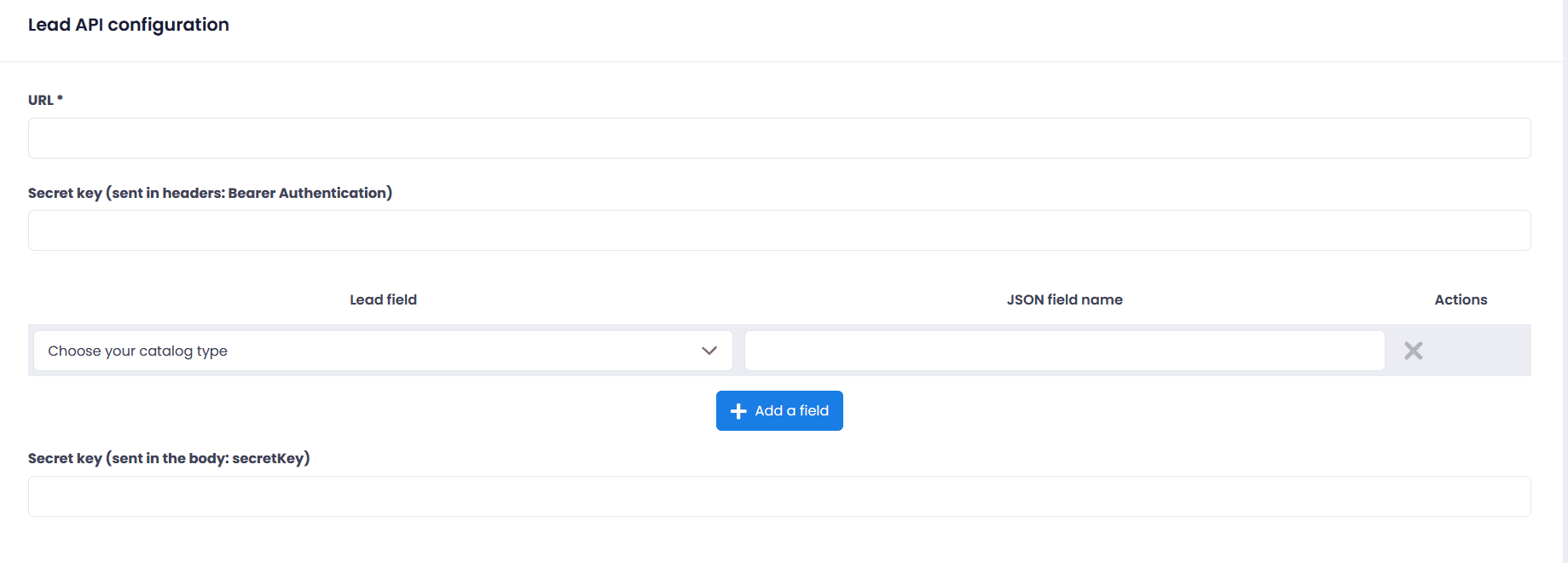
📸 Configuration interface
The page API Lead Configuration it comprises 3 main zones:
- URL* The address to send the data to (required).
- Secret key (Bearer Authentication) : To secure the delivery (sent in the headers).
- Field mapping : Mapping between your form fields and the JSON names.
- Left column : The form field (e.g. Last name, Email, Mobile phone)
- Right column : The name that will be sent in JSON (e.g. nom, email, mobile_phone)
- Secret key (body) : Optional key sent in the request body.
💡 You can add as many mappings as needed with the button + Add a field.
-
-
To your proprietary API or another API
When to use it? When you have built your own system (CRM, database) with an API.
Example configuration
- URL https://api.votrecrm.com/leads
- Secret key (Bearer) : sk_live_abcd1234xyz…
- Field mapping :
Field (form)
JSON field name
Example
Last name
name
“Doe”
E-mail
E-mail
"contact@example.com"
Cell phone
mobile_phone
“+12135096995”
Secret key (body) (optional): api_key_2024
Example of a sent request
POST https://api.votrecrm.com/leads
Headers:
Authorization: Bearer sk_live_abcd1234xyz…
Content-Type: application/jsonBody:
{
"Name": "Doe",
“email”: “contact@example.com”,
"mobile_phone": "+12135096995″,
“secretKey”: “api_key_2024”
}Checkpoints
- ✅ Your API must accept POST.
- ✅ It must handle authentication Bearer (if used).
- ✅ JSON field names must match exactly (case-sensitive).
- ✅ Test with a tool such as Postman before connecting the form in production.
-
- If you still having trouble, don't hesitate to contact our support team – they will be happy to assist you free of charge